> Free trial: Connect Viewer in MODS Connect WorkPack <
Transform work pack visibility with real-time 3D visualization.
Start your free trial today.
Bring your work packs to life inside your project’s 3D model. With Connect Viewer in MODS Connect WorkPack, you gain real-time visibility into planning and execution so your team can identify constraints earlier, coordinate smarter, and deliver faster.
> Visualize, Plan, and Execute with Confidence <
The Problem
Limited visibility slows project execution. Project teams often struggle with:
- Manual status tracking in spreadsheets
- Limited field-to-office transparency
- Difficulty identifying clashes, constraints, and bottlenecks in advance
- Time lost searching through documents and job cards
When work pack status isn’t clearly visualized in context, delays and inefficiencies follow.
The Solution
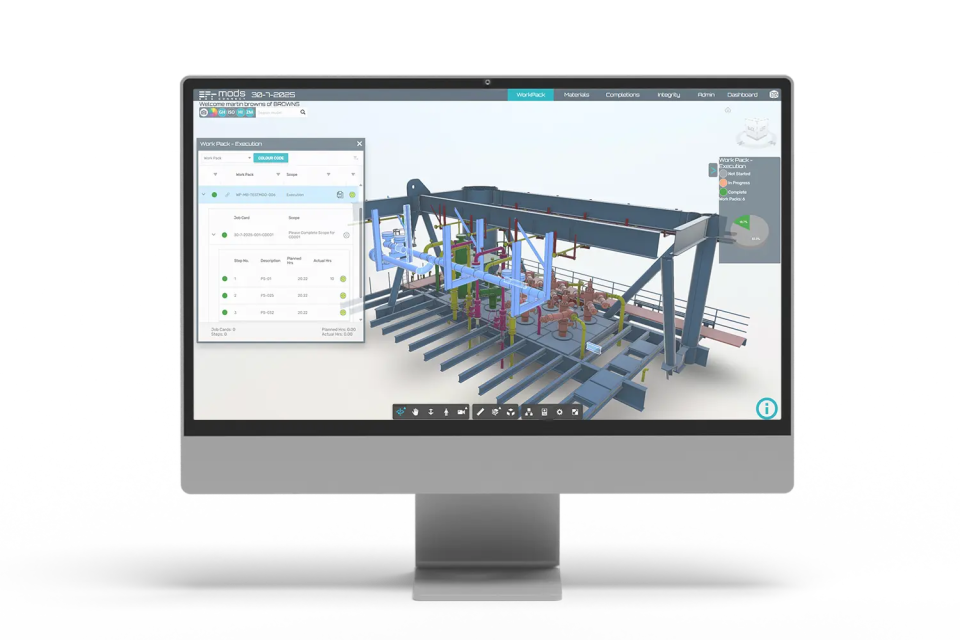
Connect Viewer enhances MODS Connect WorkPack with 2D, 3D, point-cloud and 360 visualizations for proactive project planning and execution, enabling teams to:
- Visualize real-time project work pack status in the 3D model
- Visually segregate the Execution and Planning phases
- Color code work packs by status
- Link to all project work packs with history and all documents
- Easily drill down to the job card and step levels
- Isolate systems or items from the model for clearer visibility
> Frequently asked questions
-
What’s Included in the Free Trial?
Two-weeks of full-access to an example project in the Connect Viewer 3D model feature of MODS Connect WorkPack.
This trial of Connect Viewer in MODS Connect WorkPack will allow you to:
- Navigate the 3D model environment
- Visualize real-time work pack status
- Use color coding to assess progress at a glance
- Isolate systems or equipment for clearer visibility
- Drill down to work pack and job card details
- And more…
-
What You’ll Experience During the Trial
- Full access to a live example project
- Real-time 3D Connect Viewer model to explore work pack visualization
- See how color-coding works to get a progress snapshot in context
- Isolate systems or items from the model for clearer visibility
-
How the Trial Works
- Sign up below.
- Receive an email with your login credentials.
- Explore Connect Viewer at your convenience for two weeks.
- Reach out to us at any time if you would like some help.
- We’ll notify you when the trial ends.
- No hassle. No obligation.
-
How long is the trial?
Two weeks of full access from the date of account activation.
-
Do I need to install anything?
No. This is a web-based application.
-
Will someone contact me?
Yes, one of our specialists may reach out to support your evaluation.
-
Is my project data required?
No, this is a sample project environment.


